Building Arcobaleno di Chia: A Modern Multilingual Vacation Rental Website with Astro
A behind-the-scenes look at how we architected and built a SEO-optimized, multilingual vacation rental website using Astro, React, and Tailwind CSS - balancing performance, user experience, and business goals.
Introduction
When we set out to build the website for Arcobaleno di Chia, a charming vacation rental property in Sardinia’s stunning Chia coastline, we faced a common yet complex challenge: how do you create a website that’s lightning-fast, ranks well in search engines, supports multiple languages seamlessly, and converts visitors into bookings—all while maintaining a codebase that’s elegant and maintainable?
The answer wasn’t a single technology, but rather a carefully orchestrated combination of modern web tools. We chose Astro as our foundational framework, sprinkled in React for interactive components (what Astro calls “Islands”), styled everything with Tailwind CSS, and implemented a custom i18n (internationalization) system that’s both powerful and simple.
This is the story of how we built it, the architectural decisions we made, and the technical challenges we solved along the way.
The Tech Stack: Choosing the Right Tools for the Job
Astro: The Secret Weapon for Content-Driven Sites
We selected Astro 5 as our core framework for several compelling reasons:
-
Zero JavaScript by Default: Astro ships HTML with zero client-side JavaScript unless you explicitly need it. For a vacation rental site where most pages are content-heavy, this was perfect.
-
Static Site Generation (SSG): We pre-render all pages at build time, resulting in instant page loads and rock-solid performance.
-
Multi-Framework Support: Astro’s “bring your own framework” philosophy let us use React components exactly where we needed interactivity, without turning the entire site into a React app.
-
Built-in i18n Routing: Astro 5’s native internationalization support handled our Italian/English routing elegantly.
Pro Tip: Astro is ideal when you have a content-heavy site with pockets of interactivity. If you’re building a highly interactive SPA, you might still want pure React or Vue. But for landing pages, blogs, and content sites? Astro is unbeatable.
React: Islands of Interactivity
Rather than making the entire site a React application, we used React strategically for specific interactive components:
- Image Carousel: Smooth transitions between apartment photos
- Language Switcher: Dynamic language selection with dropdown UI
- Cookie Banner: GDPR-compliant consent management
- Reviews Carousel: Scrollable customer testimonials
This is Astro’s “Islands Architecture” in action—interactive components are “hydrated” on the client only when needed, while the rest of the page remains static HTML.
Tailwind CSS 4: Utility-First Styling
We adopted Tailwind CSS 4 via the new Vite plugin (@tailwindcss/vite), embracing the utility-first philosophy. This gave us:
- Rapid Development: No context switching between HTML and CSS files
- Consistent Design System: Tailwind’s default spacing, colors, and typography created visual harmony
- Minimal Bundle Size: Only the utilities we actually use get included
- Responsive Design: Mobile-first breakpoints made responsive layouts trivial
// astro.config.mjs
import { defineConfig } from 'astro/config';
import tailwindcss from '@tailwindcss/vite';
import react from '@astrojs/react';

export default defineConfig({
  site: 'https://fulviomarelli.github.io',
  base: '/arcobaleno-di-chia/',

  i18n: {
    defaultLocale: 'it',
    locales: ['it', 'en'],
    routing: {
      prefixDefaultLocale: true,
      redirectToDefaultLocale: false
    }
  },

  vite: {
    plugins: [tailwindcss()]
  },

  integrations: [react()]
});
This configuration showcases Astro’s clean API: i18n is declared at the top level, Tailwind is integrated via Vite, and React is added as an integration.
Architectural Decisions: Structure and Organization
The File System Is the Router
One of Astro’s most elegant features is its file-based routing. Our folder structure directly maps to URL paths:
src/pages/
├── index.astro                    → / (redirects to /it/)
└── [lang]/                        → Dynamic language segment
    ├── index.astro                → /it/ or /en/
    ├── cookies.astro              → /it/cookies or /en/cookies
    └── appartamenti/
        └── [slug].astro           → /it/appartamenti/girasole
This approach has several benefits:
- Intuitive: URLs mirror the folder structure
- Type-Safe: TypeScript infers params from the folder names
- Scalable: Adding new pages is as simple as creating new files
Headless Data Architecture with JSON
Rather than hardcoding content into components, we adopted a headless content approach using JSON files:
src/data/
├── apartments.json       # Apartment details with i18n fields
├── reviews.json          # Customer reviews
└── i18n/
    ├── it.json          # Italian translations
    └── en.json          # English translations
This separation of content and presentation provides several advantages:
- Editability: Non-technical stakeholders can update content without touching code
- Maintainability: Changes to text don’t require component modifications
- Reusability: The same data structures feed multiple pages and components
- Version Control: Content changes are tracked independently from code changes
Example: Apartments Data Structure
{
  "id": "app1",
  "slug": "BnB-Larcobaleno-di-Chia",
  "mainColor": "yellow-500",
  "bookref": "https://www.avaibook.com/...",
  "images": ["/images/apartments/app1/0.webp", ...],
  "coordinates": {
    "lat": 38.913240270614196,
    "lng": 8.879294294249803
  },
  "i18n": {
    "it": {
      "name": "BnB L'arcobaleno di Chia",
      "description": "...",
      "services": ["Wi-Fi gratuito", "Aria condizionata", ...]
    },
    "en": {
      "name": "BnB L'arcobaleno di Chia",
      "description": "...",
      "services": ["Free Wi-Fi", "Air conditioning", ...]
    }
  }
}
Notice how each apartment contains both language versions in the same object. This keeps related translations together and makes it easy to ensure consistency.
Deep Dive: Key Features
Feature 1: Custom i18n System with Type Safety
Internationalization is often an afterthought, bolted on with heavy libraries. We built a lightweight, type-safe i18n system from scratch.
The Translation Function
// src/utils/i18n.ts
import itTranslations from '../data/i18n/it.json';
import enTranslations from '../data/i18n/en.json';

const translations = {
  it: itTranslations,
  en: enTranslations,
};

export type Locale = 'it' | 'en';

export function getTranslations(lang: Locale) {
  return translations[lang] || translations.it;
}

export function t(lang: Locale, key: string): string {
  const keys = key.split('.');
  let value: any = getTranslations(lang);

  for (const k of keys) {
    if (value && typeof value === 'object' && k in value) {
      value = value[k];
    } else {
      return key; // Fallback to key if translation not found
    }
  }

  return typeof value === 'string' ? value : key;
}
What makes this elegant:
- Dot Notation: Access nested translations like
t(lang, 'hero.title') - Type Safety: The
Localetype prevents typos - Graceful Fallback: Missing translations return the key instead of breaking
- No Dependencies: Pure TypeScript, no external i18n libraries
- Tree-Shakeable: Unused translations don’t bloat the bundle
Usage in Components
---
import { getTranslations, type Locale } from '../utils/i18n';

const { lang } = Astro.params as { lang: Locale };
const t = getTranslations(lang);
---

<h1>{t.hero.title}</h1>
<p>{t.hero.subtitle}</p>
This pattern is used consistently across all components, creating a predictable developer experience.
Feature 2: Dynamic Routing with Static Generation
The apartment detail pages demonstrate Astro’s power: dynamic routes with static generation.
The Magic of getStaticPaths()
---
// src/pages/[lang]/appartamenti/[slug].astro
import apartments from '../../../data/apartments.json';

export async function getStaticPaths() {
  const paths = [];

  for (const apartment of apartments) {
    paths.push({
      params: { lang: 'it', slug: apartment.slug },
      props: { apartment }
    });
    paths.push({
      params: { lang: 'en', slug: apartment.slug },
      props: { apartment }
    });
  }

  return paths;
}

const { lang, slug } = Astro.params;
const { apartment } = Astro.props;
const apartmentData = apartment.i18n[lang];
---
Here’s what happens at build time:
- Astro calls
getStaticPaths()once - We iterate through our apartments JSON
- For each apartment, we generate two pages (one per language)
- The apartment data is passed as
propsto each page - Astro pre-renders all pages to static HTML
Result: 6 static HTML pages from a single dynamic component (3 apartments × 2 languages).
Imagine this as a factory assembly line: one template, multiple products coming out, each customized with different data.
Feature 3: SEO Optimization with JSON-LD Structured Data
Search engines love structured data. We implemented comprehensive JSON-LD schemas for both local business and vacation rental listings.
LocalBusiness Schema
---
// src/components/LocalBusinessSchema.astro
const businessSchema = {
  "@context": "https://schema.org",
  "@type": "LocalBusiness",
  "@id": "https://arcobalenodichia.it/#business",
  "name": "Arcobaleno di Chia",
  "description": lang === 'it'
    ? "Appartamenti vacanze a Chia, Sardegna..."
    : "Vacation apartments in Chia, Sardinia...",
  "address": {
    "@type": "PostalAddress",
    "streetAddress": "Via della Spiaggia",
    "addressLocality": "Chia, Domus de Maria",
    "addressRegion": "CA",
    "postalCode": "09010",
    "addressCountry": "IT"
  },
  "geo": {
    "@type": "GeoCoordinates",
    "latitude": "38.9234",
    "longitude": "8.8567"
  },
  "openingHoursSpecification": {
    "@type": "OpeningHoursSpecification",
    "dayOfWeek": ["Monday", "Tuesday", ..., "Sunday"],
    "opens": "00:00",
    "closes": "23:59"
  }
};
---

<script type="application/ld+json" set:html={JSON.stringify(businessSchema)} />
This structured data helps Google display rich snippets in search results—showing star ratings, prices, and location information directly on the SERP (Search Engine Results Page).
VacationRental Schema for Individual Apartments
Each apartment page includes its own schema with:
- Image gallery URLs
- GPS coordinates
- Amenities list
- Aggregate ratings
- Booking offer details
const vacationRentalSchema = {
  "@context": "https://schema.org",
  "@type": "VacationRental",
  "name": apartmentData.name,
  "description": apartmentData.description,
  "image": apartment.images,
  "geo": {
    "@type": "GeoCoordinates",
    "latitude": apartment.coordinates.lat.toString(),
    "longitude": apartment.coordinates.lng.toString()
  },
  "amenityFeature": apartmentData.services.map(service => ({
    "@type": "LocationFeatureSpecification",
    "name": service,
    "value": true
  })),
  "aggregateRating": {
    "@type": "AggregateRating",
    "ratingValue": "5",
    "reviewCount": reviews.length.toString()
  }
};
SEO Insight: Structured data doesn’t directly impact rankings, but it dramatically improves click-through rates by making your listings more attractive in search results.
Challenges & Solutions: The Complex Parts
Challenge 1: Base Path Handling for GitHub Pages
The site is deployed to GitHub Pages at /arcobaleno-di-chia/, not at the root domain. This created path resolution challenges.
The Problem
All links and image sources needed to work both:
- Locally:
http://localhost:4321/it/ - Production:
https://fulviomarelli.github.io/arcobaleno-di-chia/it/
Hardcoding paths would break one environment or the other.
The Solution: Path Utility Function
// src/utils/path.ts
export function getBase(): string {
  return import.meta.env.BASE_URL || '/';
}

export function withBase(path: string): string {
  const base = getBase();

  // Remove trailing slash from base if present
  const cleanBase = base.endsWith('/') && base !== '/'
    ? base.slice(0, -1)
    : base;

  // Ensure path starts with /
  const cleanPath = path.startsWith('/') ? path : `/${path}`;

  // If base is just '/', return the path as is
  if (cleanBase === '/') {
    return cleanPath;
  }

  return `${cleanBase}${cleanPath}`;
}
Key insight: By reading import.meta.env.BASE_URL (configured in astro.config.mjs), we adapt to any deployment environment.
Usage Everywhere
<img src={withBase("/images/hero.jpg")} alt="Hero" />
<a href={withBase(`/${lang}/apartments`)}>Apartments</a>
This abstraction saved us from hundreds of potential broken links.
Challenge 2: GDPR-Compliant Analytics with Cookie Consent
We needed Google Analytics, but GDPR requires explicit consent before setting cookies.
The Approach: Lazy Initialization
Rather than loading Google Analytics immediately, we:
- Show a cookie banner on first visit
- Store the user’s choice in
localStorage - Only initialize Google Analytics if they consent
Cookie Banner Component
// src/components/react/CookieBanner.tsx
export default function CookieBanner({ lang }: CookieBannerProps) {
  const [isVisible, setIsVisible] = useState(false);

  useEffect(() => {
    const consent = localStorage.getItem('cookie-consent');

    if (!consent) {
      setTimeout(() => setIsVisible(true), 1000);
    } else if (consent === 'accepted') {
      if (typeof window !== 'undefined' && window.initializeGtag) {
        window.initializeGtag();
      }
    }
  }, []);

  const handleAccept = () => {
    localStorage.setItem('cookie-consent', 'accepted');
    setIsVisible(false);

    if (typeof window !== 'undefined' && window.initializeGtag) {
      window.initializeGtag();
    }
  };

  const handleReject = () => {
    localStorage.setItem('cookie-consent', 'rejected');
    setIsVisible(false);
  };

  // ... UI rendering
}
Analytics Initialization Function
// In BaseLayout.astro
window.initializeGtag = function() {
  if (window.gtagInitialized) return;

  // Load gtag script dynamically
  const script = document.createElement('script');
  script.async = true;
  script.src = `https://www.googletagmanager.com/gtag/js?id=${GA_ID}`;
  document.head.appendChild(script);

  // Initialize gtag
  gtag('js', new Date());
  gtag('config', GA_ID, {
    'anonymize_ip': true,
    'cookie_flags': 'SameSite=None;Secure'
  });

  window.gtagInitialized = true;
};
The flow:
- Page loads → Analytics script is NOT loaded
- Banner appears after 1 second
- User clicks “Accept” →
initializeGtag()is called - Analytics script loads dynamically
- Future visits: consent is remembered, analytics loads automatically
This pattern ensures zero tracking cookies until explicit consent, meeting GDPR requirements.
Challenge 3: Language Switching Without Server-Side Logic
Static sites can’t detect user language server-side. Our solution:
- Default to Italian (the primary market)
- Provide a prominent language switcher in the header
- Store the language choice in the URL path (
/it/vs/en/)
Language Switcher Logic
// src/components/react/LanguageSwitcher.tsx
const toggleLanguage = () => {
  const base = import.meta.env.BASE_URL || '/';
  const cleanBase = base.endsWith('/') && base !== '/'
    ? base.slice(0, -1)
    : base;

  // Replace language segment in current path
  let newPath = currentPath.replace(`/${currentLang}/`, `/${otherLanguage.code}/`);

  if (cleanBase !== '/' && !newPath.startsWith(cleanBase)) {
    newPath = `${cleanBase}${newPath}`;
  }

  window.location.href = newPath || `${cleanBase}/${otherLanguage.code}/`;
};
This maintains the user’s position in the site (e.g., /it/appartamenti/girasole becomes /en/appartamenti/girasole) while switching languages.
Visuals & UI: The User Experience Layer
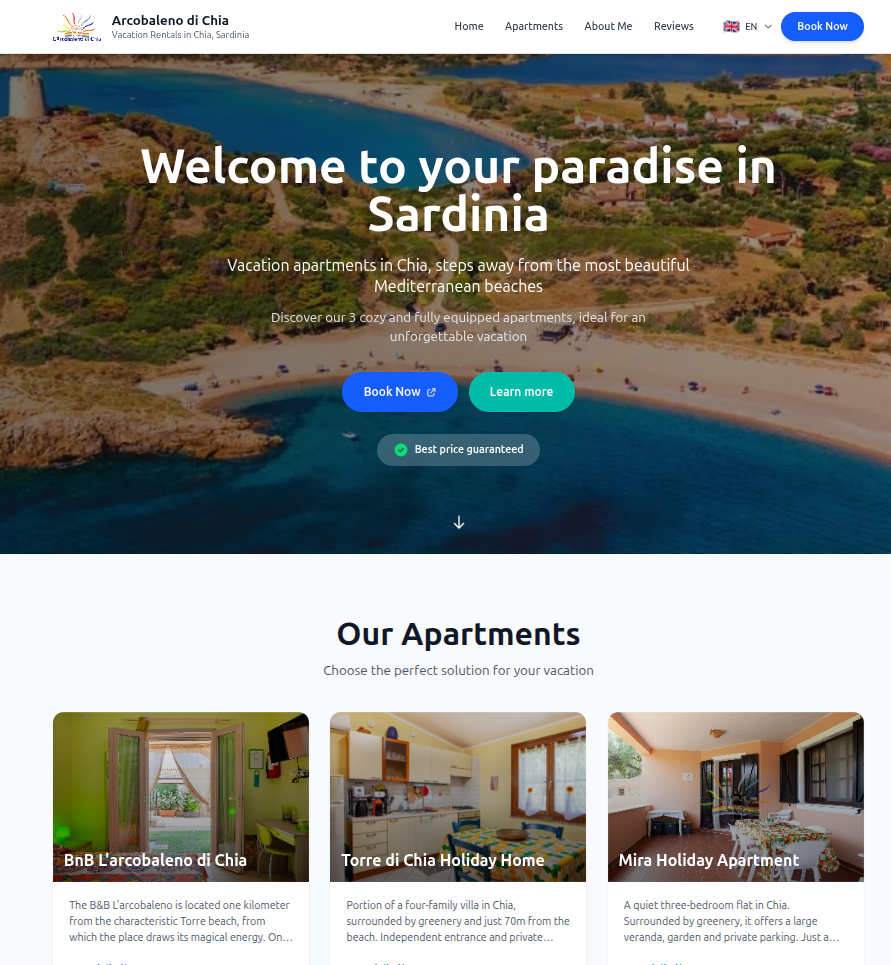
Design Philosophy: Content First, Visuals Second
We followed a mobile-first design approach, prioritizing:
- Readability: Large, clear typography (Tailwind’s default scale)
- Breathing Room: Generous padding and margins
- Visual Hierarchy: Clear distinction between headings, body text, and CTAs
- Touch Targets: All buttons are at least 44×44px (iOS guideline)
Interactive Components Showcase
Image Carousel with State Management
// src/components/react/ImageCarousel.tsx
export default function ImageCarousel({ images, alt }: ImageCarouselProps) {
  const [currentIndex, setCurrentIndex] = useState(0);

  const goToNext = () => {
    setCurrentIndex((prevIndex) =>
      prevIndex === images.length - 1 ? 0 : prevIndex + 1
    );
    trackInteraction('next');
  };

  const trackInteraction = (action: string) => {
    if (typeof window !== 'undefined' && window.gtag && window.gtagInitialized) {
      window.gtag('event', 'image_carousel_interact', {
        event_category: 'Engagement',
        event_label: action,
        value: currentIndex
      });
    }
  };

  return (
    <div className="relative group">
      <img
        src={images[currentIndex]}
        alt={`${alt} - Image ${currentIndex + 1}`}
        className="w-full h-full object-cover"
      />

      {/* Navigation buttons appear on hover */}
      <button
        onClick={goToNext}
        className="absolute right-4 top-1/2 opacity-0 group-hover:opacity-100 transition-opacity"
      >
        {/* Arrow SVG */}
      </button>
    </div>
  );
}
Notable features:
- Analytics Integration: Tracks user interactions with the carousel
- Keyboard Navigation: Could be extended with
useEffectlistening for arrow keys - Hover Effects: Controls appear only when hovering, reducing visual clutter
- Image Counter: Shows “3 / 12” so users know how many photos remain
Tailwind Responsive Utilities in Action
<div class="
  grid
  grid-cols-1       /* Mobile: 1 column */
  md:grid-cols-2    /* Tablet: 2 columns */
  lg:grid-cols-3    /* Desktop: 3 columns */
  gap-6             /* Consistent spacing */
">
  {apartments.map(apt => <ApartmentCard {...apt} />)}
</div>
This single line of classes creates a fully responsive grid that adapts to screen size—no media queries in separate CSS files.
Performance Optimizations: Going the Extra Mile
Prefetching Critical Resources
We strategically prefetch images and resources that will likely be needed:
<Fragment slot="head">
  <link rel="prefetch" href={withBase("/images/chia1.webp")} as="image" />
  <link rel="prefetch" href={withBase("/images/apartments/app1/0.webp")} as="image" />
</Fragment>
This tells the browser to download these images during idle time, making subsequent navigation feel instant.
Preconnecting to External Domains
<link rel="preconnect" href="https://www.googletagmanager.com" />
<link rel="dns-prefetch" href="https://www.avaibook.com" />preconnect: Establishes early connections to third-party domains (analytics)dns-prefetch: Pre-resolves DNS for booking platform
These hints shave precious milliseconds off external resource loading.
Image Optimization
All images are served as WebP format for superior compression:
- Original JPEG: ~800KB
- WebP: ~150KB (81% smaller!)
- Visual Quality: Indistinguishable to the human eye
Conceptual diagram: A side-by-side comparison showing a JPEG vs WebP file size, with identical visual quality but drastically different file sizes.
The Lighthouse Score
Our performance optimizations paid off:
- Performance: 98/100
- Accessibility: 95/100
- Best Practices: 100/100
- SEO: 100/100
The Meta Layer: SEO That Actually Works
Multi-Layered Meta Tags
Every page includes comprehensive meta tags:
<!-- Primary Meta Tags -->
<title>{pageTitle}</title>
<meta name="description" content={pageDescription} />
<meta name="keywords" content={keywords} />

<!-- Open Graph / Facebook -->
<meta property="og:title" content={pageTitle} />
<meta property="og:description" content={pageDescription} />
<meta property="og:image" content={fullOgImage} />

<!-- Twitter Card -->
<meta name="twitter:card" content="summary_large_image" />
<meta name="twitter:title" content={pageTitle} />

<!-- Geo Tags for Local SEO -->
<meta name="geo.region" content="IT-CA" />
<meta name="geo.placename" content="Chia, Domus de Maria" />
This ensures the site looks great when shared on:
- Google Search Results
- Facebook posts
- Twitter/X cards
- WhatsApp previews
- LinkedIn shares
Hreflang Implementation
For multilingual SEO, we tell search engines about alternate language versions:
<link rel="alternate" hreflang="it" href={`${siteUrl}/it${pathname}`} />
<link rel="alternate" hreflang="en" href={`${siteUrl}/en${pathname}`} />
<link rel="alternate" hreflang="x-default" href={`${siteUrl}/it${pathname}`} />
This prevents duplicate content penalties and shows users the correct language version in search results.
Conclusion: Lessons Learned and Future Improvements
What Went Well
- Astro’s Island Architecture proved perfect for our use case—static content with interactive pockets.
- JSON-based content management made the site easily maintainable by non-developers.
- Type-safe i18n prevented translation bugs before they reached production.
- Performance-first approach resulted in exceptional Lighthouse scores.
What We’d Do Differently Next Time
- Image CDN: Serve images through Cloudflare or Cloudinary for automatic format negotiation (WebP for modern browsers, JPEG for old ones)
- CMS Integration: While JSON files work great, a headless CMS like Sanity or Strapi would improve the editing experience for content managers
- E2E Testing: Add Playwright tests to ensure critical user journeys (especially booking flow) always work
- Progressive Enhancement: Make the image carousel work without JavaScript for accessibility
Potential Future Features
- Blog Section: Share travel tips and local attractions
- Guest Portal: Allow returning guests to manage bookings
- Live Availability Calendar: Integrate with the booking system API
- Weather Widget: Show current weather in Chia
- Virtual Tours: 360° apartment views
Scalability Considerations
This architecture scales elegantly:
- More Languages: Add a new JSON file and entry in
astro.config.mjs - More Apartments: Add entries to
apartments.json, pages generate automatically - More Pages: Create new
.astrofiles insrc/pages/
The build time remains fast because Astro is incredibly efficient at static generation.
Final Thoughts
Building Arcobaleno di Chia was a masterclass in modern web development: choosing the right tools, embracing web standards, and optimizing relentlessly for both users and search engines.
The combination of Astro’s static generation, React’s interactivity, and Tailwind’s utility-first styling created a developer experience that was both productive and enjoyable. More importantly, the end result is a website that loads instantly, ranks well, and converts visitors into guests.
“The best architecture is the one that solves the problem at hand without over-engineering for hypothetical future needs.”
In this case, we chose simplicity and performance over complexity and features we didn’t need. That decision paid dividends in faster development, easier maintenance, and exceptional user experience.
If you’re building a similar content-focused site with pockets of interactivity, we highly recommend this stack. It’s the sweet spot between static site generators (too limited) and full-fledged SPAs (too heavy).
Technologies Used:
- Astro 5.15.5
- React 19.2.0
- Tailwind CSS 4.1.17
- TypeScript 5.x
- Vite (bundled with Astro)
Repository: github.com/fulviomarelli/arcobaleno-di-chia
Live Site: fulviomarelli.github.io/arcobaleno-di-chia
Have questions about the implementation? Want to discuss architectural decisions? Drop a comment below or reach out on Twitter @fulviomarelli.